Pranay Rana: WCF
Showing posts with label WCF. Show all posts

Friday, December 21, 2012

Dispatcher in Silverlight


In this I am going to discuss about Dispatcher that makes Silverlight application responsive. I am going to show how Dispatcher allows to update UI of the application on the response from WCF service which is called anonymously and while continue to execute the other task.

Read More : DependencyObject.Dispatcher Property

What is the Example Application about ?
This is application which is fill up the Listbox on UI with the help of Dispather and WCF service which get called Asychronously so the actually thread do the task and doesnt get block.
Secondly On button click on UI its select the product in list which is get fetch using Dispatcher and WCF service.
So application is demonstration of how to use Dispatcher in Silverlight application which make use application more responsive and update UI without blocking other thread.

UI of the silverlight page

in the page "List of Item" item page Listbox get filled with the help of Dispatcher and by calling WCF service asynchronous.
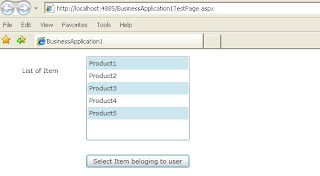
Secondly on Button click  items get selected in listbox which are get fetched by making asynchronous WCF service call and UI get updated by Dispatcher.

Now in following article going to show detail execution of the code behind this Silverlight page and how the Dispatcher  and asynchronous WCF service combination works

Structure of the application
Above is structure of the application its consist of three project
1) DataService - project contains WCF service(s).
2) BusinessApplication1 - Silverlight application i.e. application pages developed using Silverlight.
3) BusinessApplication1.Web - It host Silverlight application.

DataService Project
WCF service
WCF file is part of "DataServicwe" project in application structure. Service file of this application contains following two methods
GetList -  this method get called to return the list of all product , once call is done on UI you can see the list of product get populated.
public List<string> GetList()
{
    List<string> lst = new List<string>
                {"Product1","Product2","Product3","Product4","Product5"};
    return lst;
}
GetSelectedList - this method get list of selected products, which is get highlighted once use press button on UI.
public List GetSelectedList()
{
    List<string> lst = new List<string>
                          {"Product1","Product3","Product5"};
    return lst;
}
Note : Right now for the demo this methods directly return list of string which is hard-coded but in actual scenario this get replace by database call i.e. call to database to get the list of product and call to database to get list of product belonging to user.

BusinessApplication1 (Silverlight Application)
WCF proxy
Proxy is class file which calls WCF service and return response to UI i.e. its bridge between Silvelright UI and WCF service.
Following variable is object of WCF client service class which is generated by visual studio from WCF service which is used in Silvelright application.
Service1Client svr;
GetData Method is called from the xaml.cs page to fill the available product list which is on UI of application.
public void GetData(Action<ObservableCollection<string>,Exception> ac)
{
    svr = new Service1Client();
    svr.GetListAsync(ac);
    svr.GetListCompleted += 
       new EventHandler<GetListCompletedEventArgs>(svr_GetListCompleted);
}
in above method first line of method create instace of WCF client class.
Second line of code call to "GetListAsync" method which is generated by Visual studio and part of WCF Client class , this method is generated from "GetList" of WCF service which we discussed earlier. "ac" is passed as argument to which is method that is used for callback i.e. its XAML.CS method which do the changes in UI.
Third line of code set the event handler which is handle the event of completion of execution on WCF service.

svr_GetListCompleted Following method get called when WCF service complete execution and return response of async call made to service.
void svr_GetListCompleted(object sender, GetListCompletedEventArgs e)
{
    try
    {
     ObservableCollection<string> str = e.Result as ObservableCollection<string>;

     Deployment.Current.Dispatcher.BeginInvoke(
          (Action)(() =>
          {
            (e.UserState as Action<ObservableCollection<string>, Exception>)(str, null);
          }));


    }
    catch (Exception ex)
    {
        Deployment.Current.Dispatcher.BeginInvoke(
           (Action)(() =>
           {
             (e.UserState as Action<ObservableCollection<string>, Exception>)(null, ex);
           }));
    }
    finally
    {
       svr.GetListCompleted -= svr_GetListCompleted;
       svr.CloseAsync();
       svr = null;

     }
}
in the above method , In try block first line get the result of execution i.e. list of product which is return from WCF service.
Now in second line of code in try block Dispatcher calls method of UI whose reference is passed as object by "GetListAsync".
In Catch block if there is any exception occurs during execution than it get sent to UI method to display user.
In Finally block it remove complete handler and closeAsync call and set WCF client class object to null.
Note : You find similar method for button click and select product in product list.

Page CS file
      public MainPage()
        {
            InitializeComponent();
            LoadList();
        }
 first line in the method Initialize the page component and second line of code make call to fill the product list.
        private void LoadList()
        {
            WCFProxy proxy = new WCFProxy();
            proxy.GetData(new Action<ObservableCollection<string>, Exception>(DispalyList));

        }
This method creates the object of Proxy class which is discuss earlier and call the "GetData" method of it, as pass the reference of function called "DisplayList".
public void DispalyList(ObservableCollection<string> data, Exception ex)
        {
            if (ex == null)
                listBox1.ItemsSource = data;
        }
code in this method fill the Listbox with the items once call to WCF service completed.

Below code works same as filling product list code, But this code actually select items in productlist which actually fetch by calling WCF service. This get called on button click of Button of UI.
private void button1_Click(object sender, RoutedEventArgs e)
        {
            WCFProxy proxy = new WCFProxy();
            proxy.GetDataSelected(new Action<ObservableCollection<string>, Exception>(SelecteItems));
        }
public void SelecteItems(ObservableCollection<string> data, Exception ex)
        {
            if (ex == null)
            {
                foreach (string s in data)
                    listBox1.SelectedItems.Add(s);
            }
        } 


Main xaml  
Following is XAML code that is for the UI of application
<UserControl 
  x:Class="BusinessApplication1.MainPage"
  xmlns="
    http://schemas.microsoft.com/winfx/2006/xaml/presentation" 
  xmlns:x="
 http://schemas.microsoft.com/winfx/2006/xaml"
  xmlns:navigation="clr-namespace:System.Windows.Controls;assembly
=System.Windows.Controls.Navigation" 
 
 xmlns:uriMapper="clr-namespace:System.Windows.Navigation;assembly
=System.Windows.Controls.Navigation"
 
 xmlns:dataControls="clr-namespace:System.Windows.Controls;assembly=
System.Windows.Controls.Data.DataForm.Toolkit" 
  
  xmlns:d="
  http://schemas.microsoft.com/expression/blend/2008" 
  xmlns:mc="
  http://schemas.openxmlformats.org/markup-compatibility/2006" 
  mc:Ignorable="d" d:DesignWidth="640" d:DesignHeight="480">

  <Grid x:Name="LayoutRoot" >
        <ListBox Height="149" HorizontalAlignment="Left" Margin="152,12,0,0" Name="listBox1"
 VerticalAlignment="Top" Width="182" />
        <TextBlock Height="23" 
HorizontalAlignment="Left" Margin="39,30,0,0" 
Name="textBlock1" Text="List of Item" VerticalAlignment="Top" />
        
<Button Content="Select Item beloging to user" Height="23" 
HorizontalAlignment="Left" Margin="152,186,0,0" Name="button1"
 VerticalAlignment="Top" Width="182" Click="button1_Click" />
    </Grid>
</UserControl> 

Conclusion
So this helps to build more responsive Silverlight application using Dispatcher.

Leave comment if you have any query or if you like it.
 

Thursday, August 2, 2012

Responsive WCF service With ICallbackEventHandler Interface

In this post I am going to discuss about the development of the WCF(duplex) callback service which replay back to consumer i.e client of service and about ICallbackEventHandler Interface implementation which provide response to the user on screen.

Here I designed WCF service which is place order for client and reply back to client that order placed successfully or not. ICallbackEventHandler interface implemented on page display response to client. Before I discuss more here is the screen that shows output

Place Order

WCF service placing order

Order placed successful or not

To accomplish this whole program get divide in two part
1) Design of callback WCF service
2) Design of WEB page with ICallbackEventHandler interface to provide response on screen

Design of callback WCF service
Config file
You need to config WCF service as below to make service reliable(duplex) i.e send response back to client once task done.
<configuration>
  <system.servicemodel>
    <bindings>
      <wsdualhttpbinding>
        <binding bypassproxyonlocal="true" name="sampleBinding" usedefaultwebproxy="true">
      </binding></wsdualhttpbinding>
    </bindings>
    <services>
      <service behaviorconfiguration="returnFaults" name="Service.DemoService">
        <endpoint binding="wsDualHttpBinding" bindingconfiguration="sampleBinding" contract="Service.IDemoService">
      </endpoint></service>
    </services>
    <behaviors>
      <servicebehaviors>
        <behavior name="returnFaults">
          <servicedebug includeexceptiondetailinfaults="true">
          <servicemetadata httpgetenabled="true">
        </servicemetadata></servicedebug></behavior>
      </servicebehaviors>
    </behaviors>
  </system.servicemodel>
  <system.web>
    <compilation debug="true">
  </compilation></system.web>
</configuration>
Thing to note in config file is used protocol called "wsDualHttpBinding" that allows to create reliable session that means it allows to send response back to client who made call to service once task get completed.
WSDualHttpBinding - A secure and interoperable binding that is designed for use with duplex service contracts that allows both services and clients to send and receive messages.

WCF Service file
After creating or modifying you can code service file as below .
using System;
using System.ServiceModel;
using System.Collections.Generic;
using System.Threading;
using System.Runtime.Serialization;

namespace Service
{
IDemoService- interface that is implemented in WCF service. whose method get called by application consuming wcf service.
[ServiceContract(CallbackContract = typeof(IClientCallBack))]
    public interface IDemoService
    {
        [OperationContract(IsOneWay = true)]
        void PlaceOrder(OrderItem item);
    }
ServiceContractAttribute.CallbackContract - This attribute allows to set callback contract when the contract is a duplex contract i.e callback interface that get called by service to inform client.
So this allows client applications to listen for inbound operation calls that the server-side service application can send to client application which is independent from client activity. Callback contracts that have one-way operations represent calls from the service that the client can handle.
IClientCallBack- interface that is get implemented on the client side i.e by the application which is consuming the wcf service. Method of this interface get called from wcf service methods which is discussed below.
public interface IClientCallBack
    {
        [OperationContract(IsOneWay = true)]
        void ISOrerPlaceSuccessfully(bool issuccess, float total);
    }
OrderItem - is datacontract class of wcf service.
[DataContract]
    public class OrderItem
    {
        float price;
        string name;
        int qty;
        [DataMember]
        public float Price
        {
            get { return price; }
            set { price = value;}
        }

        [DataMember]
        public string Name
        {
            get { return name; }
            set { name = value; }
        }

        [DataMember]
        public int Quantity
        {
            get { return qty; }
            set { qty = value; }
        }
    }
DemoService - Implement service contract interface.
public class DemoService : IDemoService
    {
        public void PlaceOrder(OrderItem item)
        {
            IClientCallBack callback = OperationContext.Current.GetCallbackChannel<IClientCallBack>();
            bool success = true;
            //process order 
            float total = item.Price * item.Quantity;
            callback.ISOrerPlaceSuccessfully(success, total);
        }
    }
}
PlaceOrder - method call the callback contract method ISOrerPlaceSuccessfully.
OperationContext.Current -Gets the execution context for the current thread.
code uses the Current property and GetCallbackChannel method to create a channel back to the caller i.e to client from service method. one-way method allows service and client to communicate in both directions independently.

Design of WEB page with ICallbackEventHandler interface to provide response on screen

.ASPX file
<%@ Page Language="C#" AutoEventWireup="true" CodeBehind="Default.aspx.cs" Inherits="WebClient.Default" EnableSessionState="True"%>

<!DOCTYPE html PUBLIC "-//W3C//DTD XHTML 1.0 Transitional//EN" "http://www.w3.org/TR/xhtml1/DTD/xhtml1-transitional.dtd">
<html xmlns="http://www.w3.org/1999/xhtml">
<head runat="server">
    <title></title>
</head>
<body id="formBody" runat="server" >
    <form id="form1" runat="server">
    <div style="text-align:center">
      <h1>Place Order</h1>
    </div>
    <div>
        <table>
           <tr>
             <td><asp:Label ID="lblItemName" runat="server" Text="Label">Item Number :</asp:Label></td>
             <td><asp:Label ID="lblItemValue" runat="server" Text="Label">Test</asp:Label></td>
           </tr>
           <tr>
             <td><asp:Label ID="Label1" runat="server" Text="Label">Price :</asp:Label></td>
             <td><asp:Label ID="Label2" runat="server" Text="Label">500</asp:Label></td>
           </tr>
           <tr>
             <td><asp:Label ID="Label3" runat="server" Text="Label">Qunatity :</asp:Label></td>
             <td><asp:TextBox ID="txtQunatity" runat="server" ></asp:TextBox></td>
           </tr>
        </table>
        <asp:Button ID="Button1" runat="server" Text="Place Order" OnClick="Button1_Click" />
        <asp:Label ID="lblMsg" runat="server"></asp:Label></div>
    
    </form>
</body>
</html>

.Cs file
using System;
using System.Collections.Generic;
using System.Linq;
using System.Web;
using System.Web.UI;
using System.Web.UI.WebControls;
using WebClient.DemoService;
using System.ServiceModel;
using System.Threading;

namespace WebClient
{
Implementation of Client callback interface - here all method declare in service as part of callback contract get implemented. This method is get called by the service method once task done on service side.
public class CallBack : WebClient.DemoService.IDemoServiceCallback
    {
        public string Message
        {
            get;set;
        }
        public void ISOrerPlaceSuccessfully(bool issuccess, float total)
        {
            Thread.Sleep(5000);
            if (issuccess)
                this.Message = "Order with total of : " + total + " placed successfully";
            else
                this.Message = "Order with total of : " + total + " failed to place";
        }
    }
ISOrerPlaceSuccessfully - is callback method which is get called back from the placeorder method of service. Once response is arrived Message property value get updated which is used to show the order stats on user screen.
Note - Thread.Sleep is used in code just for the delay/demo purpose i.e to show the how it actually works when longer process get called on service. Remove it when make use in project.

ICallbackEventHandler Interface - Used to indicate that a control can be the target of a callback event on the server.
The ICallbackEventHandler is a wrapper on XMLHTTP. So that it allow to call the serverside method without any postback and there is no need to wirte any javascript/jquery for making ajax call all things get handle this interface in .net framework.
public partial class Default : System.Web.UI.Page, ICallbackEventHandler
    {
        static CallBack callback;
        DemoServiceClient client;
        protected void Page_Load(object sender, EventArgs e)
        {
        }

        protected void Button1_Click(object sender, EventArgs e)
        {
            setupClientSideCallback();
            callback = new CallBack();
            InstanceContext ic = new InstanceContext(callback);
            client = new DemoServiceClient(ic);
            OrderItem item = new OrderItem();
            item.Name = "Test";
            item.Price = 12;
            item.Quantity = Convert.ToInt32(txtQunatity.Text);
            lblMsg.Text = "Placing Order...";
            client.PlaceOrder(item);
        }
Here in above code callback is variable of type Callback clas which is static because on the order pace button get clicked value of callback is remain as it is i.e its not get created again for later on use in GetCallbackResult method which is discussed below.

OnCallback is method defined at client side which is used to call back once the clientscript register by serverside code and eventArg is a variable defined at the client side which holds the parameter value.
protected void setupClientSideCallback()
        {
           string ScriptRef = this.ClientScript.GetCallbackEventReference(this, "'" + 0 + "'", "OnCallback", "'" + lblMsg.ClientID + "'");
            formBody.Attributes.Add("onload", ScriptRef);
            string script = "<script language="javascript" type="text/javascript">
 " +
                         " function getResponse() " +
                         " { " + ScriptRef + " } " +
                         " function OnCallback(Result,Context) " +
                         " { " +
                         " var lbl=document.getElementById(Context); " +
                          " lbl.innerText=Result ; " +
                          " setTimeout(getResponse, 1000); " +
                          " } " +
                         " 
</script> ";
            this.ClientScript.RegisterClientScriptBlock(this.GetType(), "ClientCallback", script);

        }

Javascript code - get register when placeorder button get clicked. After that to check the response arrived from the wcf service or not it makes call at regular interval by using setTimeout function. So it works like timer which execute set of code at regular interval.

The ICallbackEventHandler interface has two methods which required to be implemented in the page.

RaiseCallbackEvent - This event is called when the call from client side (Javascript)i.e from browser to server. This is the event to handle the call back handler. Here eventArgs is a parameter which is passed from client side.
GetCallbackResult - This methos returns the result of the callback event to client side i.e from serverside to browser.
string ICallbackEventHandler.GetCallbackResult()
        {
            if (callback!=null && callback.Message != null)
            {
                return  callback.Message;
            }
            return "Placing Order..." ;
        }

        string eventArgument;

        void ICallbackEventHandler.RaiseCallbackEvent(string eventArgument)
        {
            this.eventArgument = eventArgument;
        } 
    }
}
Summary
WCF reliable(duplex) service useful to inform the cosumer of service i.e client of service that task completed or not by calling the consumer i.e client from service. This kind of suff useful when we are creating modules where payment of order take place as I did in my implementation.

Note
I cannot upload code over here but if you want code of the same mail me at pranayamr@gmail.com or just follow the post step and paste code in your project.
Javascript code is currenly working on IE only which will be modified soon.

Thursday, June 23, 2011

Calling Cross Domain WCF service using Jquery/Javascript

This post is about to call the cross domain WCF service from you page i.e Calling WCF service hosted on one domain and calling the service form jquery/javascript of page which is hosted on some other domain.
But before we start its better to get understand about the format of the data get exchange from one server to other server.

JSONP
Ajax allows to get data in the background without interfering with the display. Ajax call done by using XMLHttpRequest object, which is allow the client side javascript code to make HTTP connections.

But Ajax call does not allow to get data from cross-domain because of restrictions imposed by the browser. Security error get issued when requesting data from a other domain. one way to avoid security errors is to control remote server where data resides and every request goes to the same domain, that rise question what's the fun if data come form own server only? What to do if data require to get form the other server?

There is one way to come out form this limitation is to insert a dynamic script element in the Web page, one whose source is pointing to the service URL in the other domain and gets the data in the script itself. When the script loads, it executes. It works because the same-origin policy doesn't prevent dynamic script insertions and treats the scripts as if they were loaded from the domain that provided the Web page. But if this script tries to load a document from yet another domain, it will fail. Fortunately, you can improve this technique by adding JavaScript Object Notation (JSON) to the mix.

JSONP or "JSON with padding" is a complement to the base JSON data format, a pattern of usage that allows a page to request data from a server in a different domain. As a solution to this problem, JSONP is an alternative to a more recent method called Cross-Origin Resource Sharing.

Under the same origin policy, a web page served from server1.example.com cannot normally connect to or communicate with a server other than server1.example.com. An exception is the HTML <script> element. Taking advantage of the open policy for <script> elements, some pages use them to retrieve Javascript code that operates on dynamically-generated JSON-formatted data from other origins. This usage pattern is known as JSONP. Requests for JSONP retrieve not JSON, but arbitrary JavaScript code. They are evaluated by the JavaScript interpreter, not parsed by a JSON parser.

Calling Cross Domain WCF service
Now in following discuss I am going to show you how easily you can call the WCF service hosted on the other domain from the page hosted on the other domain.

Following is list of article you should look first before moving further

Create, Host(Self Hosting, IIS hosting) and Consume WCF servcie
Steps to Call WCF Service using jQuery

To start first create new solution and Add new Project which is WCF service and follow below steps

Step 1
In new release of .net 4.0 the WCF developer team added support for JSONP. There is a new property added which enable to call WCF service from other domain by setting its true.
CrossDomainScriptAccessEnabled - Gets or sets a value that determines if cross domain script access is enabled.

Change your WCF servcie config file as below


As you can see in above config code I have set crossdomainscriptaccessenabled to true and aspnetcompatibilityenabled is to true so that the WCF service works as a normal ASMX service and supports all existing ASP.NET features.
Step 2

SVC file of the service should be like as below

<%@ ServiceHost Language="C#" Debug="true" 
Service="WcfService1.Service1" 
CodeBehind="Service1.svc.cs"
Factory="System.ServiceModel.Activation.WebScriptServiceHostFactory"  %> 
Don't forget to add Factory attribute because it cause error if you remove it. Following are the reason to add Factory attribute
1. Service host factory is the mechanism by which we can create the instances of service host dynamically as the request comes in.
2. This is useful when we need to implement the event handlers for opening and closing the service.
3. WCF provides ServiceFactory class for this purpose.
Step 3

CS file for the WCF file is

using System.Runtime.Serialization;
using System.ServiceModel;
using System.ServiceModel.Activation;
using System.ServiceModel.Web;

namespace WcfService1
{
    
    [DataContract]
    public class Customer
    {
        [DataMember]
        public string Name;

        [DataMember]
        public string Address;
    }


    [ServiceContract(Namespace = "JsonpAjaxService")]
    [AspNetCompatibilityRequirements(RequirementsMode =   AspNetCompatibilityRequirementsMode.Allowed)]
    public class Service1
    {
        [WebGet(ResponseFormat = WebMessageFormat.Json)]
        public Customer GetCustomer()
        {
            return new Customer() { Name = "Pranay", Address = "1 Ahmedabad" };
        }
    }

}
As you can see in the above code I have created Service class which is service contract which servs data and Customer class is DataContract which get served as respose.
In the service class GetCustomer method service data in Json format.

Once the WCF service created to move further Add new project >> Asp.Net service. So that both the WCF service and website runs on tow different like both hosted on different domain.

There is two solution to call the Cross Domain WCF service.

Solution 1 : Call WCF service by using JQuery
Jquery already have support to handle the jsonp. Jquery library provided function ajax and getJson which can allow to call the WCF service which send jsonp data in response.

CallService - Generic function is used to call the WCF servcie, which get called by other javascript function to get and display data

var Type;
        var Url;
        var Data;
        var ContentType;
        var DataType;
        var ProcessData;
        var method;
        //Generic function to call WCF  Service
        function CallService() {
            $.ajax({
                type: Type, //GET or POST or PUT or DELETE verb
                url: Url, // Location of the service
                data: Data, //Data sent to server
                contentType: ContentType, // content type sent to server
                dataType: DataType, //Expected data format from server
                processdata: ProcessData, //True or False
                success: function (msg) {//On Successfull service call
                    ServiceSucceeded(msg);
                },
                error: ServiceFailed// When Service call fails
            });
        }
ServiceFailed - is get called when call to service fail.

function ServiceFailed(xhr) {
            alert(xhr.responseText);
            if (xhr.responseText) {
                var err = xhr.responseText;
                if (err)
                    error(err);
                else
                    error({ Message: "Unknown server error." })
            }
            return;
        }
ServiceSucceeded - is get called when the service successfully return response. As you can see in the function I am checking DataType is jsonp which is just to demonstrate that service is returning jsonp data.

function ServiceSucceeded(result) {
            if (DataType == "jsonp") {
                
                    resultObject = result.GetEmployeeResult;
                    var string = result.Name + " \n " + result.Address ;
                    alert(string); 
            }
        }
GetEmployee - is function that get called to request data from WCF service hosted on other domain. As you can see in code DataType value is get set to jsonp.

function GetEmployee() {
            var uesrid = "1";
            Type = "GET";
            Url = "http://localhost:52136/Service1.svc/GetCustomer"; 
            DataType = "jsonp"; ProcessData = false;
            method = "GetCustomer";
            CallService();
        }

        $(document).ready(
         function () {
            
             GetEmployee();
         }
);
Solution 2 : Call WCF Service by Javascript

To call the service using javascript make use of ScriptManager


in above code I set the servicereferance to the WCF service hosted on other domain.
makeCall - is function that get called to request data from WCF service hosted on other domain.

function makeCall() {
                      var proxy = new JsonpAjaxService.Service1();
                     proxy.set_enableJsonp(true);
                     proxy.GetCustomer(onSuccess, onFail, null);
                 }
onSuccess - is called when the result from the service call is received and display data.

function onSuccess(result) {
                     alert( result.Name + " " +result.Address);
                 }
onFail - is called if the service call fails

function onFail(){
                     alert("Error");
                 }
Summary
So after the addition to the special property by the WCF team its quite easy to call cross domain WCF service.
References
JSONP - WIKI
Cross-domain communications with JSONP


Wednesday, March 2, 2011

Create REST service with WCF and Consume using jQuery

Code
What is REST ?
Rest=Representational state transfer which is an architecture design to represent the resources. Rest provide the uniform interface through additional constraints around how to identify resources, how to manipulate resources through representations, and how to include metadata that make messages self-describing.
Rest is not tied with any platform and technology but WEB is only platform which satisfy the all constrain. So any thing you build using Rest constrain, you do it on Web using HTTP.

Following are the HTTP methods which are use full when creating Rest Services.


HTTP Mehtods
  • GET - Requests a specific representation of a resource
  • PUT - Create or update a ersoure with the supplied representation
  • DELETE - Deletes the specified resource
  • POST - Submits data to be processed by the identified resource
  • HEAD - Similar to GET but only retrieves headers and not the body
  • OPTIONS - Returns the methods supported by the identified resource
In this article I am going discuss how to design and consume REST web service using WCF framework of .net service. As Example I am going to create  REST service which create, update and select Employee. Now start following the steps given below.

Designing of the URI
To designing Rest services you need to design URI, so for that you need to list out the resources that going to be exposed by the service.  As I am going to design Employee Create,updae and select service, so resource is
  • Employee
Now to be more specific towards the operation
  • List of Employees
  • A Employee by Id
  • Create Employee
  • Update Employee
  • Delete Employee
For example service is hosted on on local IIS server  and URL to locate it is
        http://localhost/restservices/MyRestServices.svc
In below discussion I am going to design the URL presentation for each operation
  • List  Employees 
         URL is to get list of all employee
               http://localhost/restservices/MyRestServices.svc/Employees
         But there are no. of Employee in system and to apply filter on Employees
              http://localhost/restservices/MyRestServices.svc/Employees?type = {type}
         Note : In above url get list of employee of the type specified {type} of url.
         To Get single Emplyee by using uniqid of Employee.
              http://localhost/restservices/MyRestServices.svc/Employees/{EmployeesID}
         Note : In above URL {EmployeesID} is get replaced by ID of Employee.
         Extension to above scenario, If want to get employee by using id with the type
              http://localhost/restservices/MyRestServices.svc/Employees/{EmployeesID}?type = {type}
  • Create Employee
          URL is to create employee is
             http://localhost/restservices/MyRestServices.svc/Employees/{employeeid}
         Note : In above URL {EmployeesID} is get replaced by ID of Employee.
  • Update Employee
          URL to update employee is
             http://localhost/restservices/MyRestServices.svc/Employees/{employeeid}
         Note : In above URL {EmployeesID} is get replaced by ID of Employee.
  • Delete Employee
         URL to delete employee is
             http://localhost/restservices/MyRestServices.svc/Employees/{EmployeeID}
        Note : In above URL {EmployeesID} is get replaced by ID of Employee.

As you can see here the URL for Create, Update and Delete are same but it makes actual difference when you combile this URL with specific HTTP methods.

Now Combine the url(s) with the HTTP methods

List Employees
  • GET - http://localhost/restservices/MyRestServices.svc/Employees
Create/Update  Employee
  • PUT - http://localhost/restservices/MyRestServices.svc/Employees/{employeeid}
Note : Both Create/Update employee use the same url but when you create employee employeeid =0 and when you update employee empoloyeeid=anynumeircvalue or GUID. This URL can be differ in you implementation this just example.

Delete Employee
  • DELETE - http://localhost/restservices/MyRestServices.svc/Employees/{EmployeeID}


Designing WCF with REST
Article link to get understanding about WCF service : Create, Host(Self Hosting, IIS hosting) and Consume WCF servcie

To design Rest WCF service first start to design Class to represent Employee
[DataContract]
    public class Employee
    {
        [DataMember]
        public string Employeename { get; set; }
        [DataMember]
        public string Designation { get; set; }
        [DataMember]
        public string Address { get; set; }
        [DataMember]
        public string Email { get; set; }
    }
as you see Employee class DataContaract attribute so that is going to serve data to client i.e going to work as data exchanger.

Now start with Creation of WCF service which going to serve data to the client i.e going to work as REST full service.
You need to decorate each method in your Servercie interface with the WebInvoke attribute in addition to OperationContract, which allows user to bind method with UrlTemplate and HTTP method. Lets look the each method of interface one by one
public interface IService1
{
Get Methods
Following methods serve data which is requested using GET method of HTTP.
  • GetEmployees
Allow to get all employees. "tag" allow user to filter data because some times system contains more no. of employee which increase traffice and slow down respose, so by specifing tag=manager or tag=senior you will get specific set of employee.
[WebInvoke(Method = "POST", ResponseFormat = WebMessageFormat.Json,UriTemplate = "?tag={tag}")]
  [OperationContract]
  Employees GetEmployees(string tag);
  • GetEmployee
Allow to get the employee with specific id. "Employee_id" of the uritemplate get replace with the employeeid.
[WebInvoke(Method = "POST", ResponseFormat = WebMessageFormat.Json, UriTemplate = "Employees/{Employee_id}")]
  [OperationContract]
  Employee GetEmployee(string Employee_id);
Create and Update Method
Following method allow to insert new data and update existed using HTTP method PUT.
  • PutEmployeeAccount
This method allow to insert new employee into system and to update existed employee. "Employee_Id" of the uritemplate get replaced by employee id if update is there and 0 if new employee require to create.
[WebInvoke(Method = "PUT", ResponseFormat = WebMessageFormat.Json, UriTemplate = "Employees/{Employee_Id}")]
  [OperationContract]
   string PutEmployeeAccount(Employee Employeeobj,string Employeename );    

Delete Mehtod
Method allow to remove data using HTTP method DELETE.
  • DeleteEmployeeAccount
Method allow to delete employee from system. "Employee_Id" of the uritemplate get replace by the employee id.
[WebInvoke(Method = "DELETE", UriTemplate = "Employees/{Employee_Id}")]
  [OperationContract]
  void DeleteEmployeeAccount(string Employeename);
}
WebInvoke
  • The WebInvokeAttribute determines what HTTP method that a service operation responds to I.e Http post, get or delete.
  • Indicates a service operation is logically an invoke operation and that it can be called by the REST programming model.
UriTemplate
  • An URI template is a URI-like String that contained variables marked of in braces ({, }), which provides a consistent way for building and parsing URIs based on patterns.
  • UriTemplates are composed of a path and a query. A path consists of a series of segments delimited by a slash (/). Each segment can have a literal value, a variable value (written within curly braces [{ }] .query part is optional. If present, it specifies same way as querystring name/value pairs. Elements of the query expression can be presented as (?x=2) or variable pairs (?x={val}).
  • One of the reason to add this class in .net is to support the REST architectural style used by developers today.


Consume WCF RESTfull service
Before you start following reading below its better to know that how to configure and consume WCF service using jQuery : Steps to Call WCF Service using jQuery

Below is jQuery code to consume web service.
var Type;
var Url;
var Data;
var ContentType;
var DataType;
var ProcessData;
var method;
//Generic function to call WCF  Service
function CallService() {
   $.ajax({
      type: Type, //GET or POST or PUT or DELETE verb
      url: Url, // Location of the service
      data: Data, //Data sent to server
      contentType: ContentType, // content type sent to server
      dataType: DataType, //Expected data format from server
      processdata: ProcessData, //True or False
      success: function(msg) {//On Successfull service call
       ServiceSucceeded(msg);
      },
   error: ServiceFailed// When Service call fails
  });
 }

function ServiceFailed(result) {
   alert('Service call failed: ' + result.status + '' + result.statusText);
   Type = null; 
   Url = null; 
   Data = null; 
   ContentType = null; 
   DataType = null; 
   ProcessData = null;
}
Code above declare and initializes variables which are defined above to make a call to the service. CallService function sent request to service by setting data in $.ajax
GetEmployee
function GetEmployee() {
   var uesrid = "1";
   Type = "POST";
   Url = "Service1.svc/Employees/1";
   ContentType = "application/json; charset=utf-8";
   DataType = "json"; ProcessData = false;
   method = "GetEmployee";
   CallService();
}
GetEmployee method used to get employee with specific id. URL to make call to service is
Service1.svc/Employees/1
in this 1 is employeeid that which is example in turn this function call the RESTfull service function which is having URLTemplate Employees/{Employee_Id} and method type is POST.
CreateEmployee
function CreateEmployee() {
   Type = "PUT";
   Url = "Service1.svc/Employees/0";

    var msg2 = { "Employeename": "Denny", "Designation": "engg.", "Address": "vadodara", "Email": "pr@ab.com" };

   Data = JSON.stringify(msg2);
   ContentType = "application/json; charset=utf-8";
   DataType = "json";
   ProcessData = true;
   method = "CreateEmployee";
   CallService();
}
this method used to create employee. URL to make call to service is
Service1.svc/Employees/Denny
in this 0 is employeeID (0 because I am creating new employee) that which is example in turn this function call the RESTfull service function which is having url template Employees/{Employee_Id} and method type is POST.
In the createemployee method I am creating Employee object with the property require which is going to be consume by service to create employee.

The following code checks the result.GetUserResult statement, so your result object gets the property your service method name + Result. Otherwise, it will give an error like object not found in Javascript.
function ServiceSucceeded(result) {
   if (DataType == "json") {
     if(method == "CreateEmployee")
     {
        alert(result);
     }
     else
     {
        resultObject = result.GetEmployeeResult;
        var string = result.Employeename + " \n " + result.Designation + " \n " +          result.Address + " \n " + result.Email;
        alert(string);
     }
             
   }         
}

function ServiceFailed(xhr) {
   alert(xhr.responseText);
   if (xhr.responseText) {
      var err = xhr.responseText;
      if (err)
          error(err);
      else
          error({ Message: "Unknown server error." })
   }
      return;
 }

$(document).ready(
         function() {
             CreateEmployee();
         }
);
So in this article I am just showed example of CreateEmployee and GetEmployee because this is enough to understand how to consume the method of WCF RESTfull service. Now can create other methods by downloading code and to understand it better way.

Summary
Its quite easy to Create RESTfull service using .net WCF framework. But it must require to understand how you represent your resource i.e design URL template to represent your resource on WEB.

Wednesday, December 1, 2010

Steps to Call WCF Service using jQuery

Download Code

This article illustrates how to call Windows Communication Foundation (WCF) services from your jQuery client code, and points out where special care is needed. Before you start reading and following this article, first read this blog entry which describes how to create a WCF service: Create, Host(Self Hosting, IIS hosting) and Consume WCF servcie

Step 1

Once you are done with creating the WCF service, you need to specify the attributes on the server type class for ASP.NET  Compatibility mode, so that the WCF service works as a normal ASMX service and supports all existing ASP.NET features. By setting compatibility mode, the WCF service will have to be hosted on IIS and communicate with its client application using HTTP.

Read more about this in detail here: WCF Web HTTP Programming Object Model

Following line of code set ASP.NET Compatibility mode
[AspNetCompatibilityRequirements(RequirementsMode =
            AspNetCompatibilityRequirementsMode.Allowed)]
public class Service : IService
{
    //  .....your code
}

Service.Cs
[AspNetCompatibilityRequirements(RequirementsMode = AspNetCompatibilityRequirementsMode.Allowed)]
public class Service : IService
{
    public string GetData(int value)
    {
        return string.Format("You entered: {0}", value);
    }


    public string[] GetUser(string Id)
    { return new User().GetUser(Convert.ToInt32(Id)); }
}

public class User
{

    Dictionary<int, string> users = null;
    public User()
    {
        users = new Dictionary<int, string>();
        users.Add(1, "pranay");
        users.Add(2, "Krunal");
        users.Add(3, "Aditya");
        users.Add(4, "Samir");
    }

    public string[] GetUser(int Id)
    {
        var user = from u in users
                   where u.Key == Id
                   select u.Value;

        return user.ToArray<string>();
    }

}

Step 2

Next you need to specify attributes at operation level in the service contract file for each method or operation. To do this, decorate the method with WebInvoke, which marks a service operation as one that responds to HTTP requests other than GET. Accordingly, your operational level code in the contract file will be as follows:

[OperationContract]
    [OperationContract]
    [WebInvoke(Method = "POST", 
BodyStyle = WebMessageBodyStyle.Wrapped, 
ResponseFormat = WebMessageFormat.Json)]
    string[] GetUser(string Id);

As you can see in the code, sub-attributes having values to support calling via jQuery are marked with Method=post, so data gets posted to the service via a POST method.

ResponseFormat = WebMessaeFormat Json indicate data return as json format.

IService.cs
[ServiceContract]
public interface IService
{
    [OperationContract]
    [WebInvoke(Method = "GET",
     ResponseFormat = WebMessageFormat.Json)]
    string GetData(int value);

    [OperationContract]
    [WebInvoke(Method = "POST", BodyStyle = WebMessageBodyStyle.Wrapped, ResponseFormat = WebMessageFormat.Json)]
    string[] GetUser(string Id);
}

Step 3

You need to change the default configuration created by Visual Studio in Web.Config file for WCF services, so that it works with the HTTP protocol request send by jQuery client code.

<system.serviceModel>
  <behaviors>
   <serviceBehaviors>
    <behavior name="ServiceBehavior">
     <serviceMetadata httpGetEnabled="true"/>
     <serviceDebug includeExceptionDetailInFaults="true"/>
    </behavior>
   </serviceBehaviors>
   <endpointBehaviors>
    <behavior name="EndpBehavior">
     <webHttp/>
    </behavior>
   </endpointBehaviors>
  </behaviors>
  <services>
   <service behaviorConfiguration="ServiceBehavior" name="Service">
    <endpoint address="" binding="webHttpBinding" contract="IService" behaviorConfiguration="EndpBehavior"/>
   </service>
  </services>
</system.serviceModel>


As you can see in above config file, the EndPoint setting is changed, and EndPointBehaviors added to support WEBHTTP requests.

Note :
Endpoint settings done in the config works in conjunction with the WebInvoke attribute of the operation and the compatibility attribute set in ServiceType to support HTTP requests sent by jQuery.

Step 4

To consume web service using jQuery i.e to make call to WCF service you either use jQuery.ajax() or jQuery.getJSON(). For this I am using jQuery.ajax() method

To set the request, first define a variable. This will be helpful when you are calling multiple methods and creating a different js file to call the WCF service.

<script type="text/javascript">
         var Type;
         var Url;
         var Data;
         var ContentType;
         var DataType;
         var ProcessData;

The following function initializes variables which are defined above to make a call to the service.

function WCFJSON() {
             var userid = "1";
             Type = "POST";
             Url = "Service.svc/GetUser";
             Data = '{"Id": "' + userid + '"}';
             ContentType = "application/json; charset=utf-8";
             DataType = "json"; varProcessData = true; 
             CallService();
         }

CallService function sent request to service by setting data in $.ajax

         //function to call WCF  Service       
         function CallService() {
             $.ajax({
                 type: Type, //GET or POST or PUT or DELETE verb
                 url: Url, // Location of the service
                 data: Data, //Data sent to server
                 contentType: ContentType, // content type sent to server
                 dataType: DataType, //Expected data format from server
                 processdata: ProcessData, //True or False
                 success: function(msg) {//On Successfull service call
                     ServiceSucceeded(msg);
                 },
                 error: ServiceFailed// When Service call fails
             });
         }

         function ServiceFailed(result) {
             alert('Service call failed: ' + result.status + '' + result.statusText);
             Type = null; varUrl = null; Data = null; ContentType = null; DataType = null; ProcessData = null;
         }

Note:
The following code checks the result.GetUserResult statement, so your result object gets the property your service method name + Result. Otherwise, it will give an error like object not found in Javascript.

         function ServiceSucceeded(result) {

             if (DataType == "json") {

                 resultObject = result.GetUserResult;
               
                 for (i = 0; i < resultObject.length; i++) {
                     alert(resultObject[i]);
                 }
            
             }
        
         }

         function ServiceFailed(xhr) {
             alert(xhr.responseText);
             if (xhr.responseText) {
                 var err = xhr.responseText;
                 if (err)
                     error(err);
                 else
                     error({ Message: "Unknown server error." })
             }
             return;
         }

 $(document).ready(
         function() {
         WCFJSON();
         }
         );
</script>

Summary

It is easy to call a WCF service from your client code you; just need to set your WCF service to serve requests through the HTTP protocol and set your client to consume it via the HTTP protocol.

Tuesday, November 30, 2010

Method overloading in WCF

Problem
I found scenario where I have to implement two method with the same name i.e Function overloading. But when I implement that I got error "System.InvalidOperationException"

System.InvalidOperationException: Cannot have two operations in the same 
contractwith the same name, methods GetData and GetData in type 
WcfServiceLibrary.IService1 violate this rule.


Solution
To resolve this issue you just need to use meaning full name for the method by using NAME field available in OperationContract attribute. So you need to give name to both or one of the method to avoid this problem. As you can see in below code that I did in control IService.cs interface

        [OperationContract(Name = "GetIntegerData")]
        string GetData(int value);

        [OperationContract(Name = "GetStringData")]
        string GetData(string value);


So after doing the change I get live service but the name of the method get change by the name specified in the  Name attribute which you can see in below image


So to consume service in my client application you need to use the method name you specified in the Name attribute. The code in my client application is

            ServiceReference1.Service1Client client = new Client.ServiceReference1.Service1Client();
            Console.WriteLine(client.GetIntegerData(5));
            Console.WriteLine(client.GetStringData("pranay"));

Summary
You can easily resolve issue of method over loading in WCF service with the help of Name field in OperationContract attribute.

Wednesday, November 24, 2010

Create, Host(Self Hosting, IIS hosting) and Consume WCF servcie

Download SourceCode


What is WCF ?

Windows Communication foundation API allows to build distributed architecture in such manner that once created service code can be utilize by the in-house application which using tcp/ip to communicate, web application using http protocol to communicate to web services, application using msmq. WCF Services also works with the application developed other than .net framework.

Create WCF Service

Follow the below listed step to create Service

Step 1:
Create service from the Visual Studio select the go to c# or vb than select project type WCF Service library or WCf service website project template.


the first one create the *.dll and app.config file for after the compilation which you can than use in your host application and expose the service to clients.


the second one create the project with the proper web.config file and *.svc file which is get hosted on IIS via virtual directly and service get explose to client via HTTP protocol. so by that service can not be expose to tcp client. The benefit of this option is no need to create host application you can directly host it on iis via virtual directory.

For this discussion first I am creating WCF service library and than I am going to discuss about iis deployment also.

Step 2:
Create contract by specifing proper attributes. This contract tells the client what are the method get expose by the service and custom type expose by the service. You can decorate your contract by the list of attribute in System.ServiceModel namespace.

you can create you own files or after selecting proper project type its create two files for you Iservcie.cs and Service.cs. If you are going to create your own files its recommanded that you can create you interface and implement it in your class.

[ServiceContract] - defines the interface participate in provided service.


[OperationContract] - defines the method going to be expose by the service.


[DataMember] - defines the property expose via service.


[DataContract] - defines the custom data type expose via service.


After you done with the creation of the web service you code should look as below


Library app.config file
This file contains infomation about the metadata exchange defines endpoint of metadata. its also contains information about the endpoints where client talk with service.

Endpoints are ABC means Address, Binding and Contract. as you see in above config file service expose for tcp communication by following line


Binding details : http://www.c-sharpcorner.com/UploadFile/pjthesedays/bindwcf05032009012251AM/bindwcf.aspx


IService.Cs file


Service.cs


Hosting WCF Service
  • Self Host
  • IIS hosting
  • Windows service
  • WAS
Demo of Self hosting and IIS hosting.

Self hosting
 Step 1:
  Create new project >> Class Library >> name this project as Host

  Step 2:
  Add referance to the host application
  Right click on Referance >> Add Referance

Step 3:
After adding referance to the host application to expose webservice for client to consume
as you see below line of the code create the object of the host and which is of type Service1 Which we created in the WCF Service library project


as you can see we used using block over so that it depose host object when we close application.

Step 4:

to start the service to hadle request coming form the client of ther service  you need to call open method
        

and to stop receiving request you need to call close method


Host.cs


IIS hosting
  1. To host same WCF library in your application create WCF Web application project using WCF web application template as we discuss in start.
  2. Delete the files created in the IService.cs and Service.cs file from App_Code folder
  3. Include WCF library *.dll file which we created. 
  4. Open Service.svc file and modify the single line in it 


  5. Change the web service WEB.Config file to to expose service to client. i.e you need to create Same element as listed above in in the app.config file of service library.   
Consuming WCF Service


 Step 1:
 Create new project >> Class Library >> name this project as Client as we created Host application
     If you want to consume webservice hosted in you web application start directly for the 2 step listed below.

 Step 2:
 Add Service Referance to the client by Right click on project >> Add Service Referance


which atomatically create the proxy files to consume web service.
or
Make use of ServiceModel Metadata Utility Tool (Svcutil.exe)  the is command-line tool to generate proxy code from metadata.
   svcutil /t:code http://<service_url> /out:<file_name>.cs /config:<file_name>.config

 Step 3:
  To send request to service form the client

So as you see in above code you need to create object of Service1Client and than you can easily call the method expose by the Service. If you want to see the auto-generated code press F12 on the Service1Client it show the proxy code to you.

Summary :


As you follow the process listed process step by step its quite easy to create, consume and host WCF Service.